Quick Answer:
Implementing risk management software takes most Australian organisations of 50 to 500 staff between 6 and 12 weeks. Five steps: assess your risk profile, choose the right tool, plan the rollout, train your team, then monitor and refine. The technology is rarely what delays it. What takes the time is deciding who owns each risk, agreeing one rating scale, and cleaning the compliance records you are about to migrate. Get those three settled before you sign anything and the rollout itself is short. Sentrient’s risk management system is the example used throughout.
In this guide
Risk management is a key part of running a resilient business, and for managers and owners alike the stakes are high.
Whether it is meeting compliance obligations, keeping data safe or preventing operational disruption, the pressure is real.
Risk management software offers a structured way to handle it. This guide sets out a detailed roadmap for implementing risk management software successfully, along with the benefits, the common failure points and the questions people ask most often.
The framework is deliberately universal. You can adapt it to whichever tool you choose.
Where it matters, we have called out what changes for Australian organisations specifically, because that is where most generic implementation advice falls short.
Sentrient builds workplace compliance software for Australian and New Zealand organisations, including a risk management system that connects the register to incidents, policy acknowledgements and training records.
New to the subject? Our complete guide to risk management covers the underlying process.
This guide assumes you have decided you need a system, and are working out how to go about implementing risk management software in practice.
What Risk Management Software Actually Does
Risk management software helps organisations identify, assess and control risk in one place. Manually updated spreadsheets get replaced by automation, analytics and a centralised record.
For HR managers and business owners it covers both ends of the scale. Large exposures such as financial vulnerability, and granular day-to-day work such as managing workplace incidents.
Why it matters: unaddressed risks turn into compliance failures, penalties and reputational damage. Operational setbacks also happen more often without a system holding the record.
There is a more precise way to put it. A system does not manage risk for you. It makes the management evidenced.
The difference between an organisation that was managing risk and one that can prove it was managing risk is almost entirely a record-keeping difference, and that is what you are buying.
What Makes Australian Implementations Different
Most implementation guidance is written for a generic global buyer. Three things change here, and each one affects what you configure in week one rather than week ten.
1. The register has to carry WHS risks, not just business risks
A system configured only for strategic and financial risk will not satisfy a WHS regulator.
Regulation 36 of the model WHS Regulations sets a ranked hierarchy of control that must be worked through in order, and regulation 38 sets specific triggers for reviewing whether a control still works.
In practice that means your risk records need a field for which level of the hierarchy each control sits at, and a review trigger that fires on events rather than only on a date.
If the software cannot do both, you will end up keeping a second record outside it, which defeats the purpose.
2. Psychosocial hazards belong in the same risk register
Australian WHS law requires psychosocial hazards to be identified, assessed and controlled using the same framework as physical hazards.
Most systems will let you record them. Fewer will let you rate them consistently alongside everything else, which is what makes them visible at board level.
The cost of leaving them out is not abstract. Mental health condition claims rose 14.7% in a single year and now account for 12% of all serious claims, with median compensation of $67,400 against $16,300 across all serious claims.
3. Employee data carries Privacy Act obligations when you migrate
You are about to migrate training records, incident reports and in some cases health information into a new system.
That is personal information under the Privacy Act 1988, and some of it is sensitive information which carries higher obligations.
Ask three questions before migration, not after. Where is the data hosted? Who at the vendor can access it? What happens to it if you leave?
Getting written answers is a five-minute task at selection stage and a difficult conversation later.
Implementing Risk Management Software: The 5-Step Roadmap
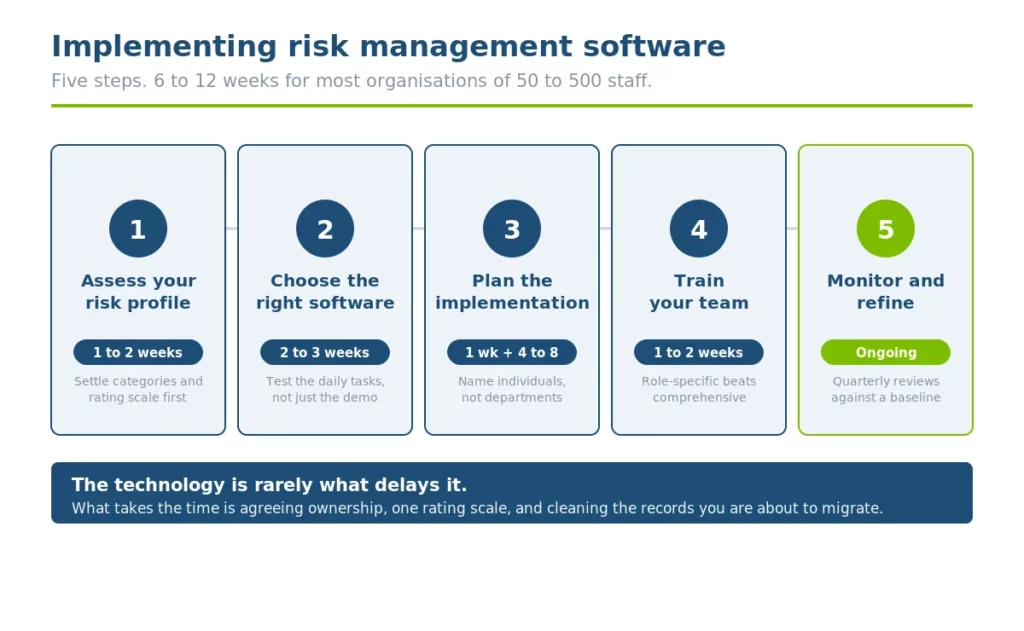
Implementing risk management software takes planning and execution rather than a single decision. These five steps break the work into manageable stages.
Step 1: Assess your organisation’s risk profile
You cannot manage what you do not understand. Assessing your risk profile is the foundation, and without it you are guessing at what matters.
Start by talking to stakeholders
Stakeholders worth talking to include leadership, owners, suppliers and regular clients.
Each can surface something different, from operational risks and missed deadlines through to a compliance gap nobody had named.
Look through your historical data
Dig into past incidents. Have there been data breaches? How did they get through? Could they get through again? Look for trends and shared characteristics you may have missed at the time.
Break the risks into categories
Compliance, operational and financial to start with. What fits depends on your industry, and the more specific you get the more complex it becomes, so stop at the level you will actually maintain.
Rank by likelihood and impact
A healthcare provider might prioritise client data privacy. A construction business might focus on occupational health and safety.
Keep everything documented and backed up separately. A risk register listing each risk, its impact and its controls is what drives clarity.
Get leadership on board
Executive buy-in is far easier when risks are tied to business goals. Show how a data breach would derail operations, or what a regulatory penalty would mean.
Use industry benchmarks to sense-check your findings: if peers in your sector report high cyber risk, check your own defences again.
Do this before you look at any software:
Whoever you buy from will configure the system around the categories and rating scale you give them. If those are not settled, you will be redesigning the register three months after go-live, with data already in it. This step is the one most often rushed and the one that costs the most to redo.
Timeframe: 1 to 2 weeks, depending on organisation size.
Step 2: Choose the right risk management software
With the risk profile built, select a tool that matches it. This step is about fit, not about picking the first option you see.
List your must-have features based on step 1. Do you need robust reporting for audits? Real-time alerts for incidents? Integration with existing HR systems? Be specific so you do not undersell your own requirements.
Explore options through demos, reviews and referrals from businesses in your industry. Look for strong customer support and regular updates.
A provider based in your own country is more likely to keep pace with local regulatory change, which matters more in compliance than in most software categories.
Your team will use this daily, so prioritise an intuitive design and test the common tasks yourself.
Enter a risk. Generate a report. Close an action. If those three are awkward in a demo, they will be awkward every day.
Then evaluate scalability and cost. Can it grow with you? Some tools offer entry-level plans that scale as needed, and it is worth checking for charges that are easy to miss, such as training, implementation or additional modules, so the comparison is like for like.
Narrow to two or three, compare them against your risk priorities, and choose. Make sure the team is behind the decision, because if they are not you will be pushing uphill from day one.
The buyer’s checklist for risk management software sets out what to test during a trial in more detail.
Pro tip:
Look for software with customisable templates. You will save considerable time tailoring it to your own risk profile rather than working around someone else’s.
Timeframe: 2 to 3 weeks, including research and trials.
Step 3: Plan the implementation
A solid plan turns a decision into a rollout. This step makes sure everyone knows their role and the timeline is realistic.
Set measurable goals. “Cut incident response time by 30%” or “every high-rated risk has a named owner and a review date” are goals a team can work towards. Vague intentions are not.
Map out the phases:
- Setup: install and configure the software. 1 to 2 days for cloud-based tools
- Data migration: transfer existing risk and compliance data. 1 to 2 weeks depending on volume and condition
- Testing: run a pilot with a small group. About 1 week
- Full launch: roll out to all users. 1 to 2 days
Assign responsibilities in a logical way, and talk to your team before finalising. Common splits are IT handling setup, HR overseeing data input and leadership tracking progress. Designate a project lead to coordinate.
Build in buffers. An extra week for testing is common once unexpected issues surface. Then share the plan and be clear about how it makes people’s jobs easier, not just what it asks of them.
Timeframe: 1 week for planning, 4 to 8 weeks for execution.
Step 4: Train your team
Adoption hinges on training. A tool your team does not use is a wasted investment, while a confident team gets the full value of it.
Tailor the plan to each role. HR needs sessions on compliance tracking and incident logging. Frontline staff usually need one thing only: how to report something.
Keep every session relevant to the person in the room and grounded in scenarios they will actually meet.
Start small. Train a pilot group of around 10 users first to iron out problems, then scale. Being overzealous here wastes company time on sessions people did not need.
Set up a help channel, such as a named contact in IT, and schedule follow-up training a few weeks after launch when real questions have surfaced.
Embed the training into your onboarding process so new starters arrive already covered.
Monitor who has logged in and completed tasks, and follow up with anyone who has not. Letting experienced staff help those who are struggling spreads the load without stretching the leadership team.
Timeframe: 1 to 2 weeks for initial training, with ongoing support.
Step 5: Monitor, refine and optimise
Implementing risk management software does not end at go-live. Continuous improvement is what keeps the system valuable.
Use built-in analytics to track KPIs such as incident frequency, resolution time and compliance rates, and compare them against your pre-implementation baseline.
If you did not capture a baseline, capture one now, because without it you cannot show the system did anything.
Talk to your people. Run a short survey a month or two after launch. What is working? What is confusing? Both formal and informal feedback are useful for refining the process.
Review regularly, with scheduled quarterly check-ins, and tweak dashboards, alerts or modules based on what you hear. Small changes compound.
And celebrate the wins by sharing them, because visible progress is what keeps momentum after the launch energy fades.
Timeframe: ongoing, with formal reviews every 3 months.
Implementing Risk Management Software: A Realistic Timeline
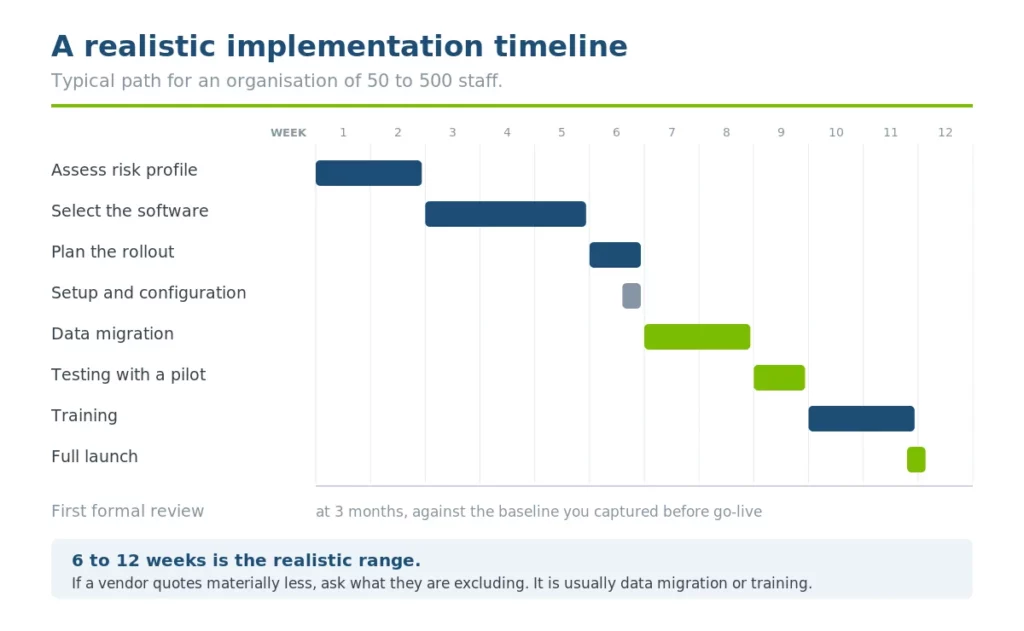
Every timeframe for implementing risk management software, in one place. This is a typical path for an organisation of 50 to 500 staff.
Larger organisations, or those migrating messy data, should extend the middle rather than the ends.
| Phase | Duration | Running total | What decides whether it slips |
|---|---|---|---|
| Assess your risk profile | 1 to 2 weeks | Week 2 | How quickly leadership can agree categories and a rating scale |
| Select the software | 2 to 3 weeks | Week 5 | Whether you tested the daily tasks or only watched a demo |
| Plan the rollout | 1 week | Week 6 | Whether roles are named individuals rather than departments |
| Setup and configuration | 1 to 2 days | Week 6 | Rarely the bottleneck for cloud systems |
| Data migration | 1 to 2 weeks | Week 8 | The condition of your existing records, not the volume |
| Testing with a pilot group | 1 week | Week 9 | Build in a buffer here. This is where the surprises appear |
| Training | 1 to 2 weeks | Week 11 | Whether training is role-specific or generic |
| Full launch | 1 to 2 days | Week 11 | Straightforward if testing was done properly |
| First formal review | At 3 months | Week 24 | Whether you captured a baseline before go-live |
6 to 12 weeks is the realistic range. If a vendor quotes materially less, ask what they are excluding, because it is usually data migration or training. If your own plan runs materially longer, the delay is almost always an unresolved decision rather than a technical problem.
What To Migrate, And What To Leave Behind
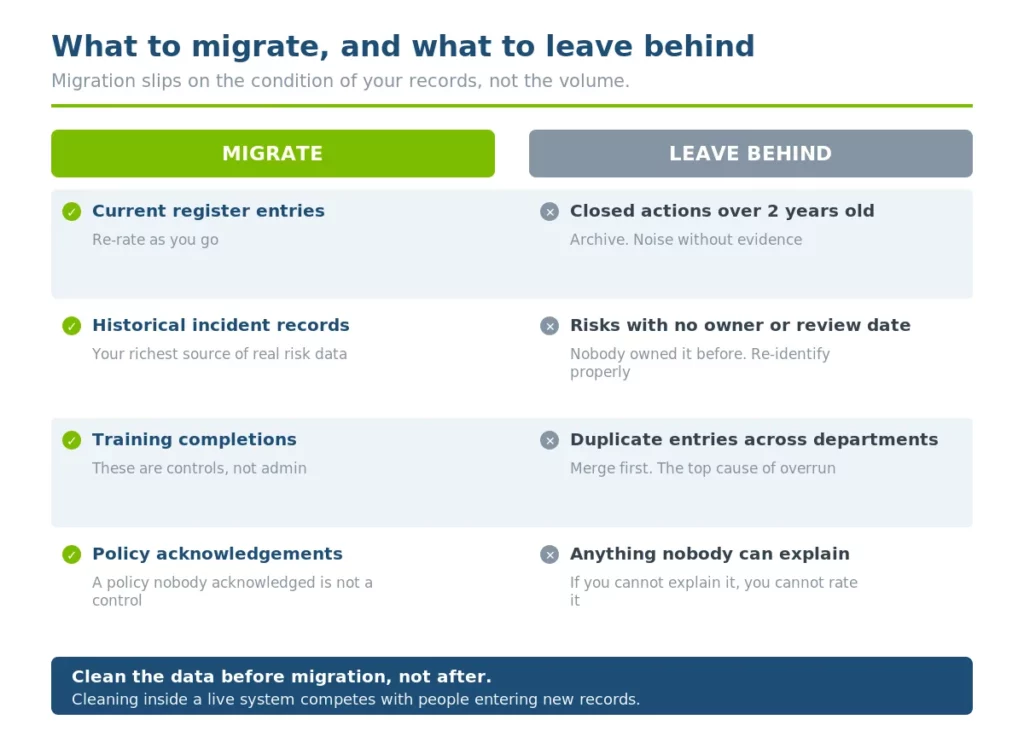
Data migration is where most timelines slip, and it is rarely about volume. It is about condition. Moving a messy register into a new system produces a messy register in a nicer interface.
| Record type | Migrate? | Why |
|---|---|---|
| Current risk register entries | Yes, after review | Re-rate as you go. Anything nobody can explain should not be carried across |
| Historical incident records | Yes | This is your richest source of real risk data, and it is what lets the register be corrected by evidence |
| Training completions and certificates | Yes | These are controls. Without them the register cannot show whether a control was in place |
| Policy acknowledgements | Yes | Same reason. A policy nobody acknowledged is not a control |
| Closed actions older than 2 years | Usually not | Archive them. They add noise without adding evidence |
| Risks with no owner and no review date | No | If nobody owned it in the old system, nobody will own it in the new one. Re-identify it properly instead |
| Duplicate entries across departments | Merge first | This is the single most common source of migration overrun |
One sequencing point. Clean the data before migration, not after. Cleaning inside a live system means doing it while people are also entering new records, and the two get confused.
If your existing register lives in a spreadsheet, why manual risk registers fail is worth reading first.
It covers the specific problems that tend to be baked into a spreadsheet register and are best resolved before they are carried into a system.
The Benefits Worth Measuring
There are real benefits to implementing risk management software.
Automated reporting and audit preparation save meaningful time, and insight into operations and customer behaviour helps you identify risk earlier and adjust how the business runs to better serve customers, which supports profitability.
Fewer incidents also means lower cost, both directly and through the time not spent responding to them.
The benefits worth actually measuring, because they can be evidenced:
- Time to produce an audit response: Measured in days before, hours after. This is the clearest and easiest to demonstrate
- Proportion of risks with a named owner: Usually the fastest metric to move, and the one that changes behaviour most
- Proportion of controls tested in the last 12 months: Almost always low at baseline, which makes the improvement visible
- Time from incident reported to action closed: Slow to shift, but the one leadership cares about
- Overdue review items: A single number that tells you whether the system is being maintained or quietly abandoned
Vague benefits such as “better visibility” are real but unprovable. Pick two or three of the above, capture the baseline before go-live, and you will be able to show what changed.
5 Reasons Implementations Fail
1. The risk register was designed by the vendor
If the categories and rating scale came from a template rather than from step 1, the register will describe a generic organisation rather than yours. People notice, and they stop trusting it.
2. Risk ownership sits with someone who cannot act
A risk owner who can report on a risk but cannot spend, stop work or change a process is a reporting line. Ownership without authority produces a register that is accurate and inert.
3. Dirty data was migrated on schedule
Migrating on time with unreviewed data feels like hitting the deadline. It moves the problem into the new system and costs more to fix later, because now there is live data on top of it.
4. Training was generic
One session covering every feature for every role means most people sit through most of it irrelevantly, and nobody remembers the part that applied to them. Role-specific and shorter beats comprehensive.
5. No baseline was captured before go-live
Six months later someone asks whether the system was worth it. Without a pre-implementation baseline, the honest answer is that nobody knows, and that is how renewals get questioned.
Bringing Your Risk Software Implementation Together
Implementing risk management software is a significant step for HR managers and business owners.
This guide, from assessing risk and choosing a tool through to planning the rollout, training your team and refining over time, gives a clear path.
The principles of implementing risk management software apply universally, whichever tool you choose.
What changes for Australian organisations is what the register has to carry: WHS risks rated against the hierarchy of control, psychosocial hazards assessed the same way as physical ones, and employee data handled with Privacy Act obligations in mind.
Sentrient fits this framework, with risk management, compliance training, policy management and incident reporting in one system so the register is informed by the rest.
For compliance-focused implementations we can be live within seven days, and full implementations typically take four to six weeks.
To see how it works for your industry and size, book a no-obligation demonstration with our Melbourne-based team.
Frequently Asked Questions
1. What is the simplest way to implement risk management software?
Begin with a thorough risk assessment to pinpoint what you actually need, then choose a usable, scalable tool with strong support. Roll it out in phases and keep the team informed throughout. Simplicity comes from preparation rather than from picking a simpler tool.
2. How long does implementation take?
For small to mid-sized teams, expect 6 to 12 weeks: 1 to 2 weeks for assessment, 2 to 3 for selection, and 4 to 8 for rollout. Larger organisations need longer for data migration and training. The variable is rarely the software. It is how long it takes to agree ownership, categories and a rating scale.
3. How does risk management software benefit HR specifically?
It automates compliance tracking, keeps employee data in one controlled place and simplifies incident reporting. HR spends less time assembling records and more time on the work those records are meant to support. It also answers the question that matters most after an incident: what training had this worker completed, and when?
4. Is risk management software worth it for a smaller organisation?
It depends on what you are trying to evidence rather than on headcount. An organisation of 40 staff with a single site and few regulatory obligations may manage well on a maintained spreadsheet. One of the same size across three sites, in a regulated sector, usually cannot. The question to ask is how long it would take today to produce a full training and policy record for one worker. If the answer is more than a few minutes, a system is doing work a spreadsheet is not.
5. What if my team will not adopt the new risk software?
Reduce resistance with role-specific training and clear, concrete benefits, such as cutting report preparation from hours to minutes. Choose an intuitive tool, involve the team in the selection, and address concerns early rather than after launch. Adoption problems are usually design and communication problems rather than attitude problems.
6. How do I know if the software is working?
Track the measures you baselined before go-live. Time to produce an audit response, proportion of risks with a named owner, proportion of controls tested in the last 12 months, and overdue review items. If none of them have moved after two quarters, that points either to the tool not fitting or to the underlying process never having changed.
7. What data should we migrate into a new risk system?
Current register entries after review, historical incident records, training completions and policy acknowledgements. Leave behind closed actions older than about two years, and do not migrate risks that have no owner and no review date. Merge duplicates before migration rather than after, because that is the most common cause of a timeline overrunning.
8. What should Australian organisations configure differently?
Three things. The register needs to record which level of the hierarchy of control each control sits at, since regulation 36 requires that order to be worked through. Review triggers need to fire on events, not just dates, to meet regulation 38. And psychosocial hazards need to be rated on the same scale as physical hazards so they are visible alongside everything else.
Sources
- Work Health and Safety Regulations 2011, regulation 36, Hierarchy of control measures
- Work Health and Safety Regulations 2011, regulation 38, Review of control measures
- Safe Work Australia, Key Work Health and Safety Statistics Australia 2025, October 2025
- Safe Work Australia, Psychosocial hazards
- OAIC, Australian Privacy Principles
- ISO 31000 Risk Management, International Organization for Standardization
Disclaimer: This guide is general information current at the date of publication and is not legal advice. Work health and safety and privacy obligations differ between jurisdictions and change over time. Confirm your obligations with the relevant regulator or a qualified adviser.
Read More About Risk Management:
- How To Choose Risk Management Software In Australia [Evergreen Buyer’s Checklist]
- Risk Management 101: A Complete Guide For Australian Businesses
- 9 Steps to Develop an Effective Risk Management Strategy: Key Steps and Best Practices
- 9 Key Components of an Effective Enterprise Risk Management Framework
- Top 10 Questions to Ask Before Choosing Risk Management Software
- How Can a Risk Management System Improve Compliance and Security