Quick Answer:
How to implement a GRC system in seven steps: assess your compliance and risk needs, choose the software, develop the framework, implement policy management, train employees, automate monitoring, then review and update. Expect eight to twelve weeks from decision to go-live for a mid-sized Australian organisation. The step most often skipped is the first, and the mistake most often made is configuring everything before using anything. Go live narrow and deep rather than wide and shallow.
In this guide
- Where this GRC implementation guide sits
- What to have in place before GRC implementation begins
- How to implement a GRC system: the seven steps
- What to configure first, and what to leave until after go-live
- How long a GRC rollout takes, week by week
- Who does what during a GRC implementation
- The go-live gate: six checks before you switch on
- Why your business needs a GRC system
- What tends to go wrong during implementation
- Choosing the right GRC software: why Sentrient
- Where to go next in the GRC guide series
- The bottom line on how to implement a GRC system
- Frequently asked questions about GRC implementation
Implementing a governance, risk and compliance system is a project with a beginning and an end.
It has a sequence, a set of decisions that have to be made in order, and a point at which you switch it on. This guide covers that project.
Most guides on how to implement a GRC system list features. This one lists the order, because in almost every rollout that stalls, the software was capable and the sequence was wrong.
This guide covers the Australian context. Obligations vary by sector, size and jurisdiction, and work health and safety duties differ between states and territories.
Where This GRC Implementation Guide Sits
There are five distinct stages between deciding something has to change and having a compliance programme that runs itself.
They get written about as though they were one thing, which is why advice on this topic so often does not fit where you actually are.
| Stage | The question it answers | Where it is covered |
|---|---|---|
| 1. Join the pillars | What do we gain by running governance, risk and compliance off one set of records? No purchase required | The benefits of integrating GRC |
| 2. Decide and choose | Do we need a system at all, and if so which one? | How to select GRC software |
| 3. The rollout | How do we get from a signed contract to a working system? | This guide |
| 4. The first 90 days | What changes in the organisation after go-live, and in what order? | Transforming your compliance strategy |
| 5. Business as usual | What does the ongoing rhythm look like? | The operating rhythm for a GRC system |
If you have not yet chosen a product, stage two is the better place to start, because half the decisions in this guide are easier once the platform is known.
If you are already live, stage four is where the useful advice is.
Whole system, or one module?
This guide covers standing up a full GRC system: governance, risk and compliance together. If you are implementing the risk module on its own, a narrower project with a shorter timeline and a different migration problem, the specific version is in implementing risk management software in 5 essential steps. The two overlap in principle and differ in scope, so pick the one that matches what you actually bought.
What GRC means, in one line
Governance decides who is accountable, risk management identifies and controls what could go wrong, and compliance meets obligations and holds the evidence. The full explanation, including the frameworks that apply in Australia, is in what is GRC. This guide assumes you already know.
What To Have In Place Before GRC Implementation Begins
Four things determine whether an implementation runs to plan, and none of them are technical.
Every one can be settled before the project starts, and every one is painful to settle mid-project.
Get these right and the question of how to implement a GRC system becomes a scheduling exercise rather than a negotiation.
| Have this settled | Why it matters | What happens if you skip it |
|---|---|---|
| An executive sponsor who will chase people | Implementation requires time from managers who do not report to you | The project stalls at the point where it needs somebody else’s week |
| A named internal owner with capacity | Someone has to make decisions between workshops, not just attend them | Configuration questions queue up and the timeline slips by the length of the queue |
| An obligations list | The system holds obligations. It cannot tell you what yours are | You configure a general-purpose system rather than yours, and rework it later |
| Agreement on who owns what | Owner fields are compulsory in every register worth having | The hardest conversation of the project arrives in week two, unprepared, with a vendor watching |
The last one is worth dwelling on. Naming an owner in software does not create authority, so if accountability is genuinely unclear in your organisation, the implementation will surface that rather than solve it.
Better to surface it deliberately, in a meeting you called, than accidentally, in a configuration session.
How To Implement A GRC System: The Seven Steps
The order matters more than the content of any single step. Steps one to three are decisions, four to six are build, and step seven never ends.
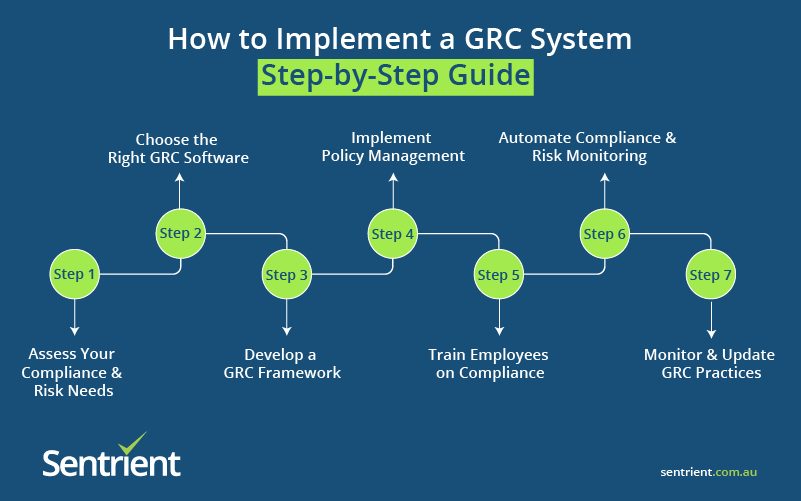
Step 1: Assess Your Compliance And Risk Needs
Before selecting or configuring anything, understand what your organisation actually has to meet.
This is the step most often skipped, and skipping it is why organisations end up configuring a general-purpose system rather than theirs.
| What to do | What good looks like |
|---|---|
| Identify the regulations that apply to you | Named Acts and sector rules, not categories. Financial services, healthcare, aged care, NDIS, education and local government each carry audit frameworks the platform should already support |
| Conduct a risk assessment | Your most significant risk areas written down, including psychosocial hazards, which now carry duties in every Australian jurisdiction |
| Review current compliance processes | An honest list of gaps and duplicated effort. Time how long producing one piece of evidence takes today, and write the number down |
| Determine stakeholders and access | Who needs to see what, and who needs to approve what. This drives your permission model, which is expensive to change later |
Step 2: Choose The Right GRC Software
With requirements clear, the evaluation becomes a comparison rather than a guess.
- Cloud-based or on-premises: Cloud platforms offer accessibility, automatic updates and lower upfront cost. On-premises makes sense where data residency or existing infrastructure demands it.
- Scalability: The system should still work when headcount grows by a third, and when a new site or service line is added.
- Integration capability: It should work with the tools you already run, particularly payroll, HR and identity.
- Australian compliance content: Ask whether policy templates and courses are written for Australian law or adapted from global templates, and who endorsed them.
- Sector fit and customisation options: Different industries have unique compliance requirements and different audit frameworks. Ask which are supported as standard, because “fully configurable” usually means you will build them.
A structured scoring method, including weights and a worked comparison of two platforms, is in comparing GRC systems in Australia.
The questions to ask a vendor before signing are in what to look for in a GRC system.
Step 3: Develop A GRC Framework
Once the platform is chosen, define the framework it will hold. Four decisions, all of them governance rather than technology.
| The decision | What it determines | Who signs it off |
|---|---|---|
| Governance structure | Who is responsible for which aspects of GRC | Executive, not the project team |
| Risk appetite | The level of risk the organisation accepts, which sets your escalation thresholds | Board or executive |
| Compliance priorities | Which obligations and policies are configured first | Compliance lead with executive endorsement |
| Reporting requirements | What leadership sees, how often, and in what form | Whoever receives the report |
The framework should align with existing policies and objectives rather than replace them. If you use ISO 31000 for risk or ISO 37301 for compliance management, this is where they attach.
APRA-regulated entities should map CPS 230 operational risk requirements here too.
Step 4: Implement Policy Management
Policy management is the fastest part of a rollout to show value, which makes it the right place to start building.
- Centralise every policy in the system so there is one current version of each
- Automate distribution to the roles each policy applies to
- Track acknowledgements, so you can evidence that a named person read a named version on a date
- Set review cycles so policies stay current as regulations change
You can upload existing policies or start from legally endorsed templates. Expect to discover more than one version of the same policy in circulation. Almost every organisation does.
Step 5: Train Employees On Compliance
Even a well-configured system does nothing if people do not use it, and training is where most of the value is either realised or lost.
- Role-based training targeted at what each person actually has to do, rather than one course for everybody
- Refresher cycles that reflect how quickly the obligation changes
- Formats people finish, because a completion rate is only useful if the completion was real
- Completion tracking by site and role, never organisation-wide only, because an average hides the one location that has stopped
Two audiences need separate treatment: managers, who have obligations workers do not, and contractors and casuals, who are the group most often missed entirely because they are not in the main onboarding flow.
Step 6: Automate Compliance And Risk Monitoring
Automation is where the administrative saving actually lands. Configure it once the records are in, not before.
- Automated alerts for compliance deadlines and expiring credentials
- Real-time risk monitoring so emerging issues surface rather than accumulate
- Automated workflows for incident reporting, investigation and corrective actions, including any regulator notification duties that carry a short clock
- Dashboards covering the compliance measures leadership will actually be asked about
Automation reduces administrative burden and stops things falling through the cracks.
It does not decide which overdue action matters most this week, and it does not act on the alert it sends.
Step 7: Monitor And Update Your GRC Practices
Implementation is not a one-time project. Step seven is the one that has no end date.
- Regular internal audits that test whether controls actually operate
- Policy and procedure updates as regulations change
- User feedback, because a process people work around is a process that will fail an audit
- Risk reassessment as the business changes, including new sites, services and jurisdictions
The single most useful habit to start in week one
A protected fifteen-minute weekly review of overdue actions, owned by a named person. Nothing in the system forces it, which is why it is the first thing to lapse and the thing whose absence quietly undoes everything else.
What To Configure First, And What To Leave Until After Go-Live
This is the decision that separates rollouts that finish from rollouts that do not, and almost nobody writes it down.
The instinct is to configure everything before switching anything on. The instinct is wrong, because a build with no users generates no feedback and no momentum.
| Configure before go-live | Why it cannot wait | Leave until after |
|---|---|---|
| Policy library with acknowledgements | Fastest visible value, and it makes the system real to everyone on day one | Advanced approval workflows and multi-stage sign-off |
| Incident and hazard reporting | It has the shortest response clock and the highest cost of failure | Custom investigation templates for every incident type |
| The risk register, with owners and review dates | Owners are the whole point. A register without them records intentions | Detailed control-effectiveness scoring and heat-map tuning |
| Mandated training for the roles that must have it | It is the evidence most often requested and most often missing | The full course catalogue and optional development content |
| One leadership report | If reporting is not live at go-live, it never quite starts | The full dashboard suite and per-team views |
| User accounts and permissions | Everything else depends on it, and changing the model later is expensive | Fine-grained delegation rules and temporary access patterns |
Narrow and deep beats wide and shallow
Take the obligation with the shortest response clock and run it end to end, including its reporting, before configuring anything else. One complete path through the system teaches you more about your own configuration than six partial ones, and it gives the project something to demonstrate in week three rather than week twelve.
How Long A GRC Rollout Takes, Week By Week
Eight to twelve weeks from signed contract to go-live is normal for a mid-sized Australian organisation on a cloud platform with pre-built Australian content.
Longer if you are migrating from another system, or if approvals have to pass through a board that meets monthly.
Anyone telling you how to implement a GRC system in a fortnight is describing a licence being issued rather than a system being stood up.
| When | What happens | What it needs from you |
|---|---|---|
| Weeks 1-2 | Kick-off, framework decisions, permission model, obligations list confirmed | Decisions, not data. This is the phase where a slow decision costs a week |
| Weeks 2-4 | Policy library loaded, structure and roles configured, first acknowledgement campaign built | Your current policies, and someone to confirm which version is the live one |
| Weeks 4-6 | Risk register migrated with owners and review dates, incident workflow configured | The hardest conversation: who owns each risk. Budget real time for it |
| Weeks 5-7 | Training assigned by role, existing completion records loaded | Current training records, however incomplete. Load them anyway, they are your baseline |
| Weeks 6-8 | Reporting configured, integrations connected, manager training delivered | Manager time. Book it early, it is the scarcest resource in the project |
| Weeks 8-10 | Pilot with one team or site, then fix what the pilot found | Willingness to delay go-live by a week if the pilot says so |
| Go-live | Switch on for everyone, with the weekly review already in calendars | An executive message that explains why, not just what |
Two things reliably extend this: an obligations list that does not exist yet, and accountability that has never been written down.
Neither is a software problem, and both cost far less to resolve before the project than during it.
Who Does What During A GRC Implementation
| Role | What they own in the project | Where it goes wrong |
|---|---|---|
| Executive sponsor | Priority, resourcing, and chasing managers who do not report to the project team | A sponsor in title only. The project needs someone who will make a phone call |
| Internal project owner | Decisions between workshops, configuration choices, and the single point of contact for the vendor | Given the role without the capacity, so decisions queue and the timeline slips |
| Compliance or risk lead | The obligations list, the risk register content, and what “good” looks like | Treated as the whole project team rather than one contributor to it |
| HR | Role and reporting structure, training assignment rules, employee data quality | Brought in at week six, after the permission model has been built without them |
| IT | Identity, access, integrations and data residency | Consulted only when an integration fails |
| Line managers | Confirming who reports to whom, and reviewing their own risks and actions | Never asked until go-live, then surprised by what lands in their queue |
| The vendor | Configuration, migration support, training the administrators, and being honest about scope | Scope creep in both directions. Agree in writing what is included and what is billed |
Settle one more thing in the contract rather than after it: who owns configuration once the project ends.
If every future change needs the vendor, changes stop being made, and a system that cannot change becomes a system nobody trusts.
The Go-Live Gate: Six Checks Before You Switch On
Go-live is a decision, not a date. These six checks are worth running as a formal gate, because each one costs far less to resolve before than after.
- Can you produce evidence for one named worker and one obligation, live, in under five minutes? Time it. If not, something in the configuration is wrong.
- Does every obligation and every risk carry a named person? Not a department. This one is binary and it is the most common gap.
- Has an incident been reported end to end in the real system, including the notification and the corrective action? A test in a sandbox does not count.
- Does the leadership report exist, and has someone received one? Reporting that starts after go-live usually does not start.
- Is the weekly review in a named person’s calendar, recurring, for the next six months? Fifteen minutes.
- Has the executive been told the numbers will get worse first? Around week three, training completion looks low because it is finally measured and incidents rise because reporting became easy. Both are the system working, and a leader seeing it unprepared concludes the opposite.
What happens in the ninety days after that gate, phase by phase, is set out in how a GRC system transforms your compliance strategy.
Why Your Business Needs A GRC System
If the project has to be justified to someone who did not ask for it, these are the three arguments that hold, and the Australian figures behind each one.
1. Regulatory Compliance
Australian obligations move constantly, and the failures regulators act on are mostly administrative rather than deliberate.
In 2024-25 the Fair Work Ombudsman issued 743 infringement notices for record-keeping or pay slip breaches, secured a record $23.7 million in court-ordered penalties, and recovered $358 million for more than 249,000 underpaid workers.
A GRC system holds obligations, policies, controls and evidence in one place, so a change lands as a task list rather than a project.
Officers also hold a WHS due diligence duty they cannot delegate, and the evidence that discharges it is exactly what the system records.
2. Risk Reduction
Risk reduction comes from controls that are checked rather than assumed.
Safe Work Australia recorded 146,700 serious workers compensation claims in 2023–24, more than 400 a day, and mental health conditions now account for 12% of them, up 161% over ten years.
Psychosocial hazard duties apply in every Australian jurisdiction, so the risk register has to cover them with the same discipline as physical hazards.
The system does not reduce risk by existing. It reduces risk by making an untested control visible, by moving a review date forward when an incident touches a risk, and by surfacing a trend at the third similar report rather than the tenth.
3. Improved Audit Preparedness
Audit preparation stops being an event. Evidence accumulates against controls as the work happens, so an audit becomes retrieval rather than reconstruction.
The same records answer sector accreditation, tender questionnaires and client due diligence, which all ask for the same artefacts: the training matrix, the incident register, the policy acknowledgements and the risk reviews, dated.
The privacy side belongs here too. The OAIC received 1,205 notifiable data breaches in 2025, the highest year since the scheme began, and 37% of breaches notified in the first half of 2025 were caused by human error.
Under the Privacy Act an assessment clock starts the moment you become aware, which is far easier to meet when the report is already in a system.
What Tends To Go Wrong During Implementation
Eight problems account for most stalled GRC rollouts: high costs, resistance to change, integration issues, data management complexity, resource constraints, a poor understanding of what GRC is, a siloed approach, and technology that was never fit for the job.
Each of those has a specific fix, and they are covered in full, with the fix alongside each problem, in overcoming GRC implementation challenges.
That is the companion to this guide: this page is the sequence, that page is what breaks in it.
The pattern worth knowing before you start
Most of those eight are organisational rather than technical. That is not a reason to skip the technical planning, but it does mean that if your implementation stalls, the first place to look is not the software.
Choosing The Right GRC Software: Why Sentrient
Sentrient is an Australian-built GRC platform that holds policies, compliance training, incident and hazard reporting, risk registers and audits in one system, with reporting across all of it.
Compliance courses are legally endorsed by Australian lawyers, the platform is hosted and supported in Australia, and the support team is based in Melbourne.
More than 1,000 organisations across Australia and New Zealand use it, and most customers are operational within about a week for a standard scope.
The clearest fit is regulated mid-sized employers between 50 and 500 staff in healthcare, aged care, NDIS, not-for-profits, local government and schools.
It is a poor fit for businesses under 20 staff, organisations that primarily need payroll or rostering, and buyers who need a single specialist module rather than connected coverage.
Being specific about the second list matters more than the first, because an implementation that should never have started is the most expensive kind.
Explore the GRC system, the GRC software modules or the workplace compliance system in detail.
Bring your own scenario to the demonstration
Ask us to produce, live, the evidence that one named worker met one obligation on one date, and time it. Then ask what the first four weeks of implementation would need from your team. Book a free demo.
Where To Go Next In The GRC Guide Series
| If you are asking | Go to |
|---|---|
| What is GRC, and what does each pillar do | What is GRC? Governance, risk and compliance explained |
| What do we gain by joining the three pillars | The benefits of integrating GRC |
| Do we need a system at all, or should we fix the process first | How to select GRC software |
| Which products should be on my shortlist | The 10 best GRC software tools in Australia |
| How do I score two shortlisted platforms | Comparing GRC systems in Australia |
| What should I ask a vendor before signing | What to look for in a GRC system |
| What does each capability actually do | Top 12 GRC system features Australian organisations need |
| Which Australian regulations must the platform support | GRC systems compliance in Australia |
| What goes wrong during implementation, and how do I fix it | Overcoming GRC implementation challenges |
| What changes in the first 90 days after go-live | How to transform your compliance strategy |
| What does the rhythm look like after that | The operating rhythm for a GRC system |
| How do I connect the platform to our other business tools | How to integrate compliance software with existing business tools |
| We are only implementing the risk module, not the whole system | Implementing risk management software in 5 essential steps |
| What does a GRC system mean for HR managers | The GRC system secret every Australian HR manager should know |
The Bottom Line On How To Implement A GRC System
| The point | In one line |
|---|---|
| Sequence beats features | Most stalled rollouts had capable software and the wrong order |
| Step one is the one people skip | Assess before you choose, or you will configure a general-purpose system rather than yours |
| Narrow and deep, not wide and shallow | One obligation end to end beats six half-built modules |
| Owners are the whole point | A register without named people records intentions, not accountability |
| Eight to twelve weeks is realistic | What extends it is a missing obligations list and unwritten accountability |
| Go-live is a gate, not a date | Six checks, and the willingness to move the date by a week |
| Step seven never ends | Audit, update, listen, reassess. The weekly review is what keeps the rest alive |
Frequently Asked Questions About GRC Implementation
1. What is a GRC system, and why does my business need it?
A GRC system holds governance, risk and compliance in one place: policies with acknowledgements, a risk register with owners, incident and hazard reporting, compliance training records, audits, and reporting across all of it. Australian businesses need one when the volume of obligations exceeds what spreadsheets and goodwill can hold, which usually happens somewhere between 50 and 150 staff, or sooner in a regulated sector.
2. How do I implement a GRC system, step by step?
Seven steps, in order: assess your compliance and risk needs, choose the right software, develop the framework, implement policy management, train employees, automate monitoring, then monitor and update continuously. Steps one to three are decisions, four to six are build, and step seven has no end date. The order matters more than the content of any single step.
3. What are the key components of a governance, risk and compliance system?
Policy management with version control and acknowledgements, a risk register with owners and review dates, incident and hazard reporting with escalation and corrective actions, compliance training with completion and expiry tracking, audits and inspections against templates, and reporting that cuts across all of them. The connection between those components is what makes it a system rather than five tools.
4. How does a GRC system help with regulatory compliance?
It registers an obligation once and shows everything that obligation touches, so a regulatory change becomes a task list rather than a project. It also produces the evidence a regulator actually asks for: who acknowledged which policy version, who completed which training and when, what happened after the last incident. Being compliant and being able to demonstrate compliance are different states, and only the second one survives an audit.
5. How long does it take to implement a GRC system?
Eight to twelve weeks from signed contract to go-live is normal for a mid-sized Australian organisation on a cloud platform with pre-built Australian content. Add time for migration from another system, or where approvals wait on a monthly board. What reliably extends it is a missing obligations list and accountability that has never been written down, both of which cost far less to resolve before the project starts.
6. What is the most common mistake when implementing a GRC system?
Configuring everything before using anything. A build with no users generates no feedback and no momentum, and month three arrives with nothing live. Take the obligation with the shortest response clock, run it end to end including its reporting, and add the next one after that.
7. Should we go live with everything at once or in stages?
In stages, but not by module. Go live with one complete path through the system rather than half of every module. Policy management, incident reporting, the risk register with owners, mandated training and one leadership report are the go-live set. Advanced approval workflows, control-effectiveness scoring and the full dashboard suite can wait.
8. What industries benefit most from a GRC system?
Sectors with audit frameworks and credentials that expire: healthcare, aged care, NDIS and disability services, education and independent schools, local government, not-for-profits, financial services and construction. The test is not industry so much as whether anything you hold has a date attached, because a spreadsheet cannot tell you a clearance lapses in 30 days.
9. Is a cloud-based GRC system better than an on-premise solution?
For most Australian mid-sized organisations, yes: accessibility, automatic regulatory content updates and lower upfront cost. On-premise makes sense where data residency requirements or existing infrastructure demand it. Ask any cloud vendor where the data is hosted and who supports it, because in Australia that answer matters for both compliance and response times.
10. How do I train employees on using a GRC system?
Role-based rather than one course for everyone, with managers trained separately because they carry obligations workers do not. Track completion by site and role rather than organisation-wide, since an average hides the one location that has stopped. Do not forget contractors and casuals, who are the group most often missed because they sit outside the main onboarding flow.
11. What should I understand before implementing a GRC system?
Four things, all settled before day one: an executive sponsor who will chase people, a named internal owner with actual capacity, a written list of the obligations that apply to you, and agreement on who owns what. None are technical, and each one is painful to settle mid-project.
12. Why should organisations implement GRC software?
Because the obligations already apply and the administration to manage them does not scale with headcount. Software removes the version of failure where the work was done and nobody can prove it: the policy updated in one folder but not the intranet, the contractor never enrolled in induction, the risk review that slipped because its owner changed roles.
13. What are the benefits of implementing a GRC programme?
Evidence produced in minutes rather than assembled over days, fewer repeat incidents, nothing expiring unnoticed, less duplicated administration, decisions made on current information, and every obligation carrying a named owner. Each is measurable, and each is worth baselining before you start so the before-and-after means something.
14. What happens after go-live?
Roughly 90 days to business as usual: records and owners in month one, the reporting and review rhythm in month two, and the first real evidence request in month three. Expect the numbers to look worse around week three, because training completion is finally being measured and incident reporting has become easy. Brief your executive before that happens rather than after.
Disclaimer: This article is general information for Australian workplaces, not legal advice. Obligations differ by state, territory, industry and company structure. Get advice on your specific circumstances from a qualified professional.
Sources
Safe Work Australia: Key Work Health and Safety Statistics Australia, latest release
Safe Work Australia: Duties under WHS laws
Safe Work Australia: Psychosocial hazards
Safe Work Australia: Incident notification
OAIC: Data breach notifications increase to all-time high in 2025
OAIC: Notifiable Data Breaches scheme
OAIC: The Privacy Act
Fair Work Ombudsman: Annual Report 2024-25, $358 million back-paid to Australian workers
Fair Work Ombudsman: Record-keeping
APRA: Prudential Standard CPS 230 Operational Risk Management
ISO: ISO 31000 Risk management
ISO: ISO 37301 Compliance management systems
Last reviewed: October 2026
Read More About Governance, Risk Management And Compliance
- What Is GRC? Governance, Risk And Compliance Explained
- Overcoming GRC Implementation Challenges
- The Benefits Of Integrating GRC Into Your Business Operations
- How A GRC System Can Transform Your Compliance Strategy In Australia
- The Ultimate Guide To GRC Systems In Australia
- Top 12 GRC System Features Australian Organisations Need
- Using GRC Platforms To Prepare For Your Next Audit